Building OCR for smart glasses
Egocentric optical character recognition (OCR) on glasses: from text detection to user intent

Note: I drafted this note in 2022. Updated with a 2026 perspective at the end.
TL;DR
These people problems drive the case for egocentric OCR on glasses: 1) users face friction executing simple tasks, 2) users don’t have the right information at the right time, and 3) users need to remember too many things.
These technical challenges stand in the way: 1) handling the variety of scenarios, conditions, and surfaces that text shows up on in the wild, 2) understanding which text the user is focused on and what actions they’d want to take, and 3) modeling efficiencies required to operate on device.
Context
Understanding text has enabled knowledge sharing at unprecedented scale. AI that replicates human reading skills can enhance how people interact with the physical world.
Optical Character Recognition (OCR) detects and recognizes words, laying the foundational steps for text understanding. Pair OCR with smart glasses and the implications shift: a user lands at a foreign airport, sees signs in Spanish, and their glasses translate the text to English automatically.
Success means providing information and text actions to users when needed, in a way that feels natural and easier than pulling out a phone.
People problems
1. Users face friction executing simple tasks. From the moment a user wakes to when they sleep, they rely on a variety of computing devices to execute simple tasks: setting an alarm, translating aisle signs at the grocery store, or saving a reminder for later. Each step carries friction, from taking out their device, to navigating to the right app, to selecting the right action.
2. Users don’t have the right information at the right time. Throughout the day, users need specific information at specific moments, whether it is directions, restaurant reviews, or currency conversions. By understanding the text a user encounters, glasses can provide the context they need immediately or infer the actions a user would want to take.
3. Users need to remember too many things. Human memory is limited. Yet, users accumulate an overload of information throughout their lives: personal identifiers like social security number, driver licenses or school IDs, favorite products of loved ones, or ever-growing lists of actions to do. On top of this information accumulation, users are expected to recall from memory specific bits when needed, such as when filling out forms, splitting expenses at the end of a trip, or grabbing a specific wine varietal for a friend’s birthday.
Scenarios people face
These problems occur across multiple parts of a user’s day and life:
Travel: help users orient themselves and feel safer in an unfamiliar environment
Local discovery: help users discover restaurants and local businesses they may be interested in
Shopping: help users learn more about what to buy so they can buy with confidence
Health: help users get the information they need about various foods so they can make informed health decisions
Everyday productivity: help users save time and remove friction by streamlining everyday tasks
Learn: help users get context about objects in the world around them
Memory & organization: help users offload, sort through, and easily retrieve information when needed
Work & school: help users learn in alternative ways in the classroom and office
Below are the hero use cases for people as they travel the world, discover their neighborhood, and conduct everyday tasks.
Travel: translate a menu, poster, or sign while traveling in a foreign country
Local discovery: pull up information about a store or restaurant while exploring the local neighborhood
Everyday productivity: call/message a phone number, open a website, navigate to an address
Text objects
Each type of text object has its distinct characteristics and challenges. They can be roughly grouped into three categories:
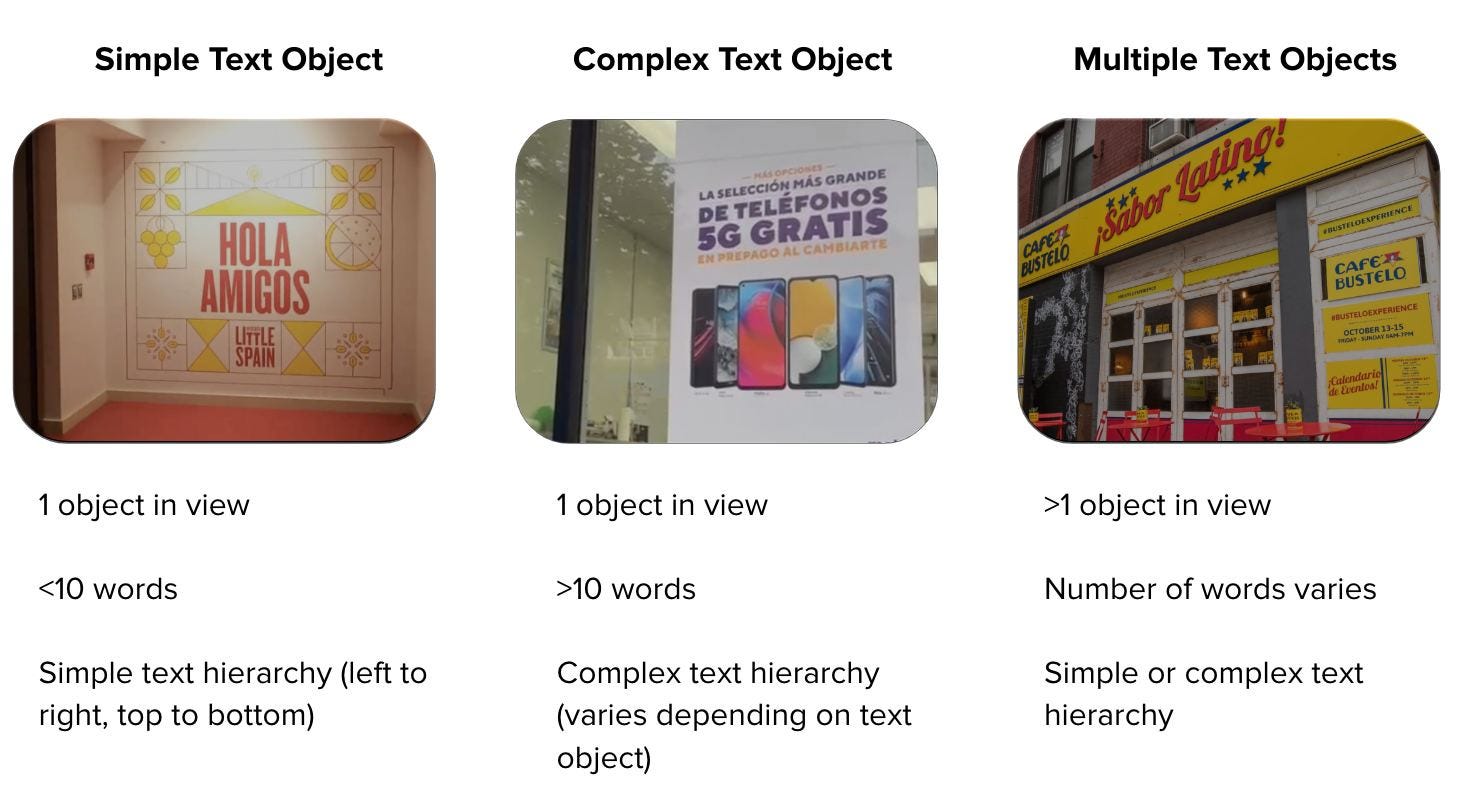
Simple text objects (single road sign, storefront). Easy to handle. Few words to detect and recognize. Since there is only one text object, it’s clear what the user is focused on.
Complex text objects (posters, menus). Harder. Due to glasses’ limited screen display, the system needs to intuit and display the text in order of relevance or provide users an easy and intuitive way to get to the text they need. Some users may use Hand-Object Interaction (HOI) or finger pointing to provide disambiguation, but given this won’t happen in most scenarios, the system must discern what text is the most important to users without explicit signal.
Multiple text objects (multiple road signs on a post, a storefront with posters). Harder still. The system needs to intuit which objects are the most important to the user, even in the absence of HOI or finger pointing.
Problems to solve for egocentric OCR
Egocentric OCR (EgoOCR) challenges. EgoOCR is the model focused on detection and recognition of text-in-the-wild from a user’s point of view. There are a few challenges we need to overcome:
Experience-related:
Nonstandard text orientations. Text-in-the-wild includes rotated text, curved text and vertical text. Standard detection uses rectangular bounding boxes. With these nonstandard text types, the boxes need to be big enough to encompass the text, making it more likely to capture surrounding characters. Handwriting is also a prevalent and difficult problem, given the variety of styles between people.
Environmental factors. Lens flare, head movements, or hair partially covering the lens, all produce unclear, blurry, or occluded images that degrade OCR performance.
Text grouping and ordering. Complex text objects have complicated text hierarchies, e.g., posters that are not meant to be read left to right and top to bottom. The system needs to understand which words should be grouped together and what order to read them in.
Intent disambiguation. A user may see a vast amount of text at any point, whether it is a particularly complex text object with many words or multiple text objects simultaneously. So which text object and what text within the text object is the user interested in? Two types of disambiguation exist: with user interaction (hand object interaction or finger pointing), and without.
Model-related:
On-device efficiency. Deploying OCR to glasses introduces efficiency tradeoffs given limited memory, compute and latency requirements. Downsampling images before feeding them to the OCR model results in smaller text that is difficult to detect and recognize.
Representative datasets. Existing datasets are either not representative of egocentric use cases or carry licensing restrictions that prevent shipping.
Egocentric OCR metrics. Recall and Precision (R@P) measures raw OCR model performance, but it doesn’t capture whether the system works for the user. Product-centric metrics can measure how well OCR performs in the context of what the user needs.
Key opportunities
1. Increase OCR model accuracy & efficiency
Consistent, accurate results are table stakes. On-device operation demands low latency, minimal memory usage, and low battery consumption. Specific investments: smart cropping to combat small text from image downsizing, improved angle prediction for rotated text, and data augmentation (e.g. synthetic data) to expand training coverage.
2. Develop text grouping and ordering models
Word-level OCR modeling is not sophisticated enough for complex text objects. Downstream use cases like live translation and entity understanding require text layout analysis: which text should be grouped together, what order to read the text in.
3. Understanding text through Natural Language Processing
Beyond detection and recognition, the system needs to understand meaning and context. Recognizing text entities (addresses, URLs, phone numbers) enables action inference: navigating to an address, opening a URL, calling a phone number.
4. Establish Metrics
We need to define and measure:
Text layout metric: measuring grouping, ordering, and end-to-end performance from detection to layout analysis.
User intent disambiguation metric: measuring how well the system identifies what the user is focused on.
Product centric metric: metric that measures how well OCR performs in the context of a user’s needs. For example, a translation metric.
5. Create Taxonomy of Text Objects
An extensible taxonomy ensures coverage of all relevant text objects and enables per-category performance measurement. Key dimensions for each text object include how critical it is for product use cases, how high accuracy needs to be (e.g. phone numbers need 100% accuracy; a menu can tolerate more error), how the typographical hierarchy differs per object (in situations with complex or multiple text objects, the system needs to understand how to order each phrase).
Metaproperties to track per text object include text density/sparsity, distance from user, and surface type.
6. Add Language Support
The goal is enabling people to understand and act on virtually any language in the world. Broad language coverage is foundational.
2026 perspective: what’s changed
I wrote this in 2022. Here’s what LLMs changed:
NLP. In 2022, I framed NLP as a separate opportunity area layered on top of OCR. Large language models have since collapsed text understanding, entity recognition, and action inference into a single capability. The question is no longer “build an NLP pipeline on top of OCR” but “feed OCR output to an LLM and let it handle understanding and action.”
Intent disambiguation. LLMs can use surrounding context, user history and scene understanding to infer which text matters, partially offsetting the disambiguation gap. Eye tracking has also matured as a direct signal for intent disambiguation.
nice intro read! i wonder if there’ll be the rise of specialized models that learn how to route to smaller models that know which of these scenarios it’s dealing with?